LMMS
| LMMS | |
|---|---|
 | |
 Screenshot of a project in LMMS 1.2.1 | |
| Original authors | Paul Giblock Tobias Junghans[1] |
| Developer | LMMS developers |
| Initial release | 2004; as Linux MultiMedia Studio |
| Repository |
|
| Written in | C++ with Qt[2] |
| Engine | |
| Operating system | Cross-platform: Windows, macOS, Linux, Haiku |
| Platform | x86 and x86-64 (Linux, macOS, Windows), only Linux: arm64, armel, armhf, mips, mips64el, mipsel, ppc64el, s390x[2] |
| Available in | 20 languages[3] |
| Type | Digital audio workstation |
| License | GPL-2.0-or-later[4] |
| Website | lmms |
LMMS (formerly Linux MultiMedia Studio[5]) is a digital audio workstation application program. It allows music to be produced by arranging samples, synthesizing sounds, entering notes via computer keyboard or mouse (or other pointing device) or by playing on a MIDI keyboard, and combining the features of trackers and sequencers. It is free and open source software, written in Qt and released under GPL-2.0-or-later.
System requirements
[edit | edit source]LMMS is available for multiple operating systems, including Linux, OpenBSD, macOS, and Windows. It requires a 1.5 GHz CPU, 1 GB of RAM and a two-channel sound card.[6]
Program features
[edit | edit source]LMMS accepts soundfonts and GUS patches, and it supports the Linux Audio Developer's Simple Plugin API (LADSPA) and LV2 (only master branch, since 24.05.2020). It can use VST plug-ins on Win32, Win64, or Wine32. The nightly versions support LinuxVST. Currently MacOS doesn't support them.[7][8]
It can import Musical Instrument Digital Interface (MIDI) and Hydrogen files and can read and write customized presets and themes.[9]
Audio can be exported in the WAV, FLAC, Ogg and MP3 file formats.[10]
Projects can be saved in the compressed MMPZ file format or the uncompressed MMP file format.[11]
Editors
[edit | edit source]- Song Editor – for arranging instruments, samples, groups of notes, automation, and more
- Beat+Bassline Editor – for quickly sequencing rhythms
- FX Mixer – for sending multiple audio inputs through groups of effects and sending them to other mixer channels, infinite channels are supported
- Piano Roll – edit patterns and melodies
- Automation Editor – move almost any knob or widget over the course of the song
-
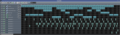 Song Editor
 -
 Beat+Bassline Editor
 -
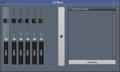 FX mixer
 -
 Piano Roll
 -
 Automation Editor


Audio plug-ins
[edit | edit source]LMMS includes a variety of audio plug-ins that can be drag-and-dropped onto instrument tracks in the Song Editor and Beat+Bassline Editor.
Synthesizer plugins:
- BitInvader – single-oscillator synthesis
- FreeBoy – emulator of Game Boy audio processing unit (APU)
- Kicker – drum synthesizer
- LB302 – imitation of the Roland TB-303
- Mallets – tuneful percussion synthesizer
- Monstro – 3-oscillator synthesizer with modulation matrix
- Nescaline – NES-like synthesizer
- OpulenZ – 2-operator FM synthesizer
- Organic – organ-like synthesizer
- sfxr – port of Tomas Petterson's sfxr generator
- SID – emulator of the Commodore 64 chips
- TripleOscillator – 3-oscillator synthesizer with 5 modulation modes
- Vibed – vibrating string modeler
- Watsyn – 4-oscillator synthesizer with 4 modulation modes
- Xpressive – mathematical expression parser synthesizer (only in alpha)
- ZynAddSubFX
Other plugins
- AudioFileProcessor (AFP) – basic sampler with trimming and looping capabilities
- Carla Patchbay and Carla Rack – implementation of Carla access through a plugin (only in alpha)
- GIG Player – libgig-based GigaSampler/GigaStudio instrument file player
- PatMan – GUS patch player
- SlicerT – slicer with tempo detection (only in nightly)
- Sf2 Player – a Fluidsynth-based SoundFont player
- VeSTige – interface for VST2 plugins
Standards
[edit | edit source]- Musical Instrument Digital Interface (MIDI)
- SoundFont (SF2)
- Virtual Studio Technology (VST)
- Linux Audio Developer's Simple Plugin API (LADSPA)
- LV2 (only master branch, since 24.05.2020)
- Gravis Ultrasound (GUS) patches
- GigaStudio/GigaSampler instrument files
- JACK Audio Connection Kit (JACK)
- ZynAddSubFX
Audio output examples
[edit | edit source]
See also
[edit | edit source]- List of music software
- List of Linux audio software
- Comparison of free software for audio
- Multitrack recording
- Comparison of multitrack recording software
Lua error in mw.title.lua at line 392: bad argument #2 to 'title.new' (unrecognized namespace name 'Portal').
References
[edit | edit source]- ^ Lua error in Module:Citation/CS1/Configuration at line 2172: attempt to index field '?' (a nil value).
- ^ a b Lua error in Module:Citation/CS1/Configuration at line 2172: attempt to index field '?' (a nil value).
- ^ Lua error in Module:Citation/CS1/Configuration at line 2172: attempt to index field '?' (a nil value).
- ^ Lua error in Module:Citation/CS1/Configuration at line 2172: attempt to index field '?' (a nil value).
- ^ Lua error in Module:Citation/CS1/Configuration at line 2172: attempt to index field '?' (a nil value).
- ^ Lua error in Module:Citation/CS1/Configuration at line 2172: attempt to index field '?' (a nil value).
- ^ Lua error in Module:Citation/CS1/Configuration at line 2172: attempt to index field '?' (a nil value).
- ^ Lua error in Module:Citation/CS1/Configuration at line 2172: attempt to index field '?' (a nil value).
- ^ Lua error in Module:Citation/CS1/Configuration at line 2172: attempt to index field '?' (a nil value).
- ^ Lua error in Module:Citation/CS1/Configuration at line 2172: attempt to index field '?' (a nil value).[permanent dead link]
- ^ Lua error in Module:Citation/CS1/Configuration at line 2172: attempt to index field '?' (a nil value).
- Lua error in Module:Citation/CS1/Configuration at line 2172: attempt to index field '?' (a nil value).
- Lua error in Module:Citation/CS1/Configuration at line 2172: attempt to index field '?' (a nil value).
External links
[edit | edit source]


 | This music software article is a stub. You can help Wikipedia by expanding it. |
- 2004 software
- Audio editing software for Linux
- Audio editing software that uses Qt
- Audio software
- Digital audio editors for Linux
- Digital audio workstation software
- Free audio editors
- Free educational software
- Free music software
- Free software programmed in C++
- Linux software
- Open source software synthesizers
- Software drum machines
- Music software stubs