GoWarrior
This article has multiple issues. Please help improve it or discuss these issues on the talk page. (Learn how and when to remove these messages)
|


 | |
| Type | Single-board computer |
|---|---|
| Processor | ARM Cortex A9 |
| Memory | 1GB DDR3 |
GoWarrior is an open-source and community-supported computing platform.[1] GoWarrior is designed for new and experienced users to build electronics projects.[2] It offers hardware, software and cloud service.[3]
TIGER Board
[edit | edit source]TIGER Board is a single-board computer performs as hardware for GoWarrior platform. It contains ARM Cortex A9[3] based M3733-AFAAA[4] (SoC), ARM Mali-400 MP2, as well as integrated 1 GB DDR3 RAM.[1]
-
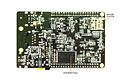 The picture points the MicroSD card slot on TIGER Board
Hardware specification
[edit | edit source]GoWarrior specifications[5] are:


| Component | Specifications |
|---|---|
| Soc | ALi M3733-AFAAA |
| CPU | 1.7 GHz ARM Cortex A9 |
| GPU | ARM Mali-400 MP2 |
| RAM | 1GB DDR3, dual-channel |
| Internal Storage | 4GB NAND Flash |
| SD card | MicroSD card slot (up to 64GB) |
| PMU | Embedded Power Management Unit (PMU)
Supports Real-time Clock |
| Ethernet (RJ45) | 10/100Mbit/s |
| Wi-Fi | 802.11 b/g/n |
| Bluetooth | Bluetooth 4.0 |
| IR | IR receiver for infrared remote control |
| HDMI | Supported resolutions: 720x480, 720x576, 1280x720, and 1920x1080 |
| Analog A/V Out | 3.5mm to RCA |
| USB | 2 X USB 2.0 + 1 X Micro USB |
| Buttons & Switch | One button is for client mode. The other two buttons are user-defined buttons.
One Switch for selecting to boot to from NAND Flash or MicroSD card. |
| LEDs | Total 11 LEDs to indicate different status |
| Expansion Headers | Two 40-pin male headers. J3 and J4 are multiplexed to provide access to the features. |
| Other Debug | One JTAG connector reserved on the board, but requires additional hardware and software. |
| I/O expansions | GPIO: 63 pins
PWM: 2 pins |
| Operating system | Android 4.4.4 based GoDroid |
| Weight | 1.48oz (42grams) |
| Dimensions | 93.2mm X 59.7mm |
| Power | 5V via MicroUSB and/or 1.3mm barrel connector (DC In Only) |
Available operating systems
[edit | edit source]GoDroid
[edit | edit source]GoDroid is an Android KitKat 4.4.4.[6] based optimized operating system for GoWarrior platform. In addition to original Android functionalities, GoDroid pre-integrates some useful middleware components and libraries, as well as some self-developed function blocks, which makes it also a software development kit for Android applications.[7]
Features
[edit | edit source]Booting option
[edit | edit source]GoDroid supports booting from NAND Flash or from MicroSD card that contains the boot code and image files.[8]
Multimedia
[edit | edit source]By replacing Android native media engine StageFright with GStreamer and utilizing hardware acceleration facilities, GoDroid supports various audio/video/container hardware decoding and multiple network protocols including Microsoft Smooth Streaming, HTTP Live Streaming and KODI 14.2 has variety of supported video/audio plug-ins.[9]
Wireless display standards
[edit | edit source]Besides the screen mirroring function of Android Miracast, GoDroid also implements DLNA system service for sharing digital media among multimedia devices. DMR, DMS and DMP are supported.[7]
Programming language
[edit | edit source]In addition to C/C++/Java, GoDroid also integrates QPython2engine for Python 2 programming on Android.[6]
Inter-connection with other OSH platform
[edit | edit source]TIGER Board provides 2 sets of 40-pin expansion headers, one of which is compatible to Raspberry Pi connector. Raspberry Pi Python applications can be ported and run on GoDroid.[3]
Integrated development environment
[edit | edit source]GoDroid supports Android Studio as application IDE. With API level 19 configuration to match GoDroid provides the availability of not only original Android API, but also proprietary extended API, such as GPIO/IC2/SPI/PWM.[5]
Debugging
[edit | edit source]GoDroid supports standard ADB debugging via Ethernet, Wi-Fi and USB.[1]
GoBian
[edit | edit source]GoBian is a Linux-embedded operating system running on TIGER Board for the GoWarrior platform.
GoBian is developed based on Raspbian which is from Debian 7 wheezy armhf, and differs from Raspbian for the extra features, for example, GoBian encapsulates the RPi.gpio and other I/O libraries to facilitate transplanting projects which use the related libraries from Raspberry Pi to TIGER Board. Furthermore, GoBian provides support for multimedia by integrating GOF, KODI and other middle-ware modules and applications out-of-the-box.
Features
[edit | edit source]Networking & remote access
[edit | edit source]GoBian enables the Internet connection through Ethernet or Wi-Fi through the Ethernet port and Wi-Fi module on TIGER Board, and thus supports various methods to access the projects and transfer data, such as FTP, SSH.
Timekeeping
[edit | edit source]GoBian automatically synchronizes the system time with Internet time servers using the NTP protocol.
File system
[edit | edit source]GoBian integrates a built-in file system for data management.
Built-in programming environments
[edit | edit source]C, C++, Python, Perl, and shell script.
I/O interfaces
[edit | edit source]GoBian lets you call the GPIO/I2C/UART/SPI interfaces directly in your projects with the built-in RPi.gpio and other libraries.
Multimedia
[edit | edit source]GoBian makes it easy for the secondary development of multimedia applications with the customized GOF middle-ware for TIGER Board.
Multitasking
[edit | edit source]The on-board M3733-AFAAA processor makes GoBian a multitasking system with good performance.
Linux software
[edit | edit source]The software programs that are available for Debian are basically compatible with GoBian.
Low-power sleep mode
[edit | edit source]GoBian supports the ultra-power-saving sleep mode (PMU Standby), with the entire board power consumption as low as 0.35W.
Multi-screen sharing
[edit | edit source]GoBian integrates with DLNA to fully support the multimedia sharing and multi-screen interaction.
CloudQ
[edit | edit source]CloudQ provides back-end community support to users.[9]
References
[edit | edit source]- ^ a b c Lua error in Module:Citation/CS1/Configuration at line 2172: attempt to index field '?' (a nil value).
- ^ Lua error in Module:Citation/CS1/Configuration at line 2172: attempt to index field '?' (a nil value).
- ^ a b Lua error in Module:Citation/CS1/Configuration at line 2172: attempt to index field '?' (a nil value).[permanent dead link]
- ^ Lua error in Module:Citation/CS1/Configuration at line 2172: attempt to index field '?' (a nil value).
- ^ a b Lua error in Module:Citation/CS1/Configuration at line 2172: attempt to index field '?' (a nil value).
- ^ a b Lua error in Module:Citation/CS1/Configuration at line 2172: attempt to index field '?' (a nil value).
- ^ a b Lua error in Module:Citation/CS1/Configuration at line 2172: attempt to index field '?' (a nil value).
- ^ Lua error in Module:Citation/CS1/Configuration at line 2172: attempt to index field '?' (a nil value).
- ^ a b Lua error in Module:Citation/CS1/Configuration at line 2172: attempt to index field '?' (a nil value).[permanent dead link]